

Anything Adds Plan Mode to Let Users Review and Approve Builds Upfront
Anything has launched Plan Mode, a new feature that generates a full build blueprint for users to review and approve before the AI writes any code.
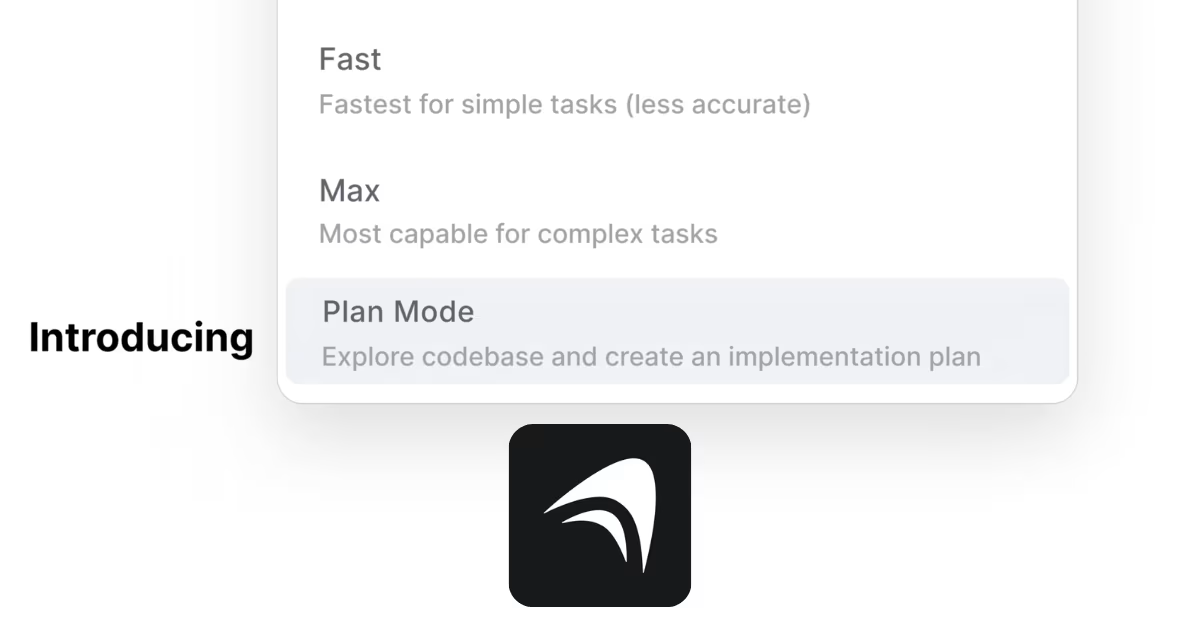
AI app builder Anything has launched a new feature called Plan Mode, giving users a way to review and approve a full build plan before any code is written.
Anything lets users describe an app in plain language and receive a fully working web or mobile application in return, without writing a single line of code.The platform handles everything from the front end and back end to databases, payments, and third-party integrations.
With Plan Mode, the process now includes an extra step before building begins. When a user submits a prompt, Anything generates a detailed blueprint broken into clear sections such as project setup, database structure, backend logic, and frontend design. Each section lists what will be built and the steps to get there.
Users can then review this blueprint and chat with Anything to make changes. They can add or remove features, adjust the structure, or clarify what they want. The tool waits for approval before writing any code or using any computing credits.
This is a shift from how AI builders typically work, where the tool jumps straight into building after receiving a prompt. Plan Mode introduces a checkpoint that lets users align on the outcome first.
Early users have responded positively, with many pointing out that the feature helps avoid costly rewrites when the AI builds something that misses the mark. Others have noted it is especially useful for freelancers and agencies who need a clear plan to share with clients before work begins.
Plan Mode joins three existing build options in Anything, which are Auto, Fast, and Max. It is already available in the app and can be selected directly from the mode picker when starting a new project.
Recent News

 ChatGPTChatGPT
OpenAI Gives ChatGPT Users Bank Reset for Every Day Without Astra
 Haneem
 Meta AIMeta AI
Meta Launches Muse Spark 1.3 With Big Coding Upgrades
Haneem
 Claude CodeClaude Code
Claude Code Weekly Limits Set to Shrink Next Month
Haneem
 LovableLovable
Lovable Grabs lovable.com After Years of Jokes
Haneem
 ElevenLabsElevenLabs
ElevenLabs Launches CLI v1 to Bring Voice Agents Into the Terminal
Haneem
 ResendResend
Resend Now Lets Free Users Verify Up to 3 Domains
HaneemComments
Sign in to leave a commentNo comments yet. Be the first!